How to Know If Your Phone Is Hacked: 10 Warning Signs and Fixes (2026)
Quick Answer: If you want to know how to tell if your phone is hacked, watch for these key signs: unusually fast battery drain, unknown apps, sudden data spikes, your camera or microphone light turning on by itself, and two-factor authentication (2FA) codes you never requested. This guide covers all 10 warning signs your phone is hacked, a real-world case study, and step-by-step fixes for both iPhone and Android.
Your smartphone is the most personal device you own. It stores your bank accounts, emails, photos, passwords, and private messages — making it the number-one target for cybercriminals in 2026.
The alarming truth is that most people do not realize their phone has been hacked until serious damage is already done. In this guide, you will learn exactly how to know if your phone is hacked, how to spot the warning signs early, and what steps to take — whether you use an iPhone or an Android device.
1. How Common Is Phone Hacking in 2026? (Key Statistics)
Mobile phone hacking is one of the fastest-growing cybersecurity threats in the world today, affecting millions of smartphone users at record rates.

(Zimperium)
(Certo Software)
(Certo Software, 2025)
(Kaspersky)
(Kaspersky)
(Kaspersky)
According to the 2025 Zimperium Mobile Threat Report, 18.1% of all mobile devices worldwide had malware installed — that is roughly 1 in every 5 smartphones. No device, brand, or operating system is immune.
2. 10 Warning Signs Your Phone Is Hacked (Checklist)
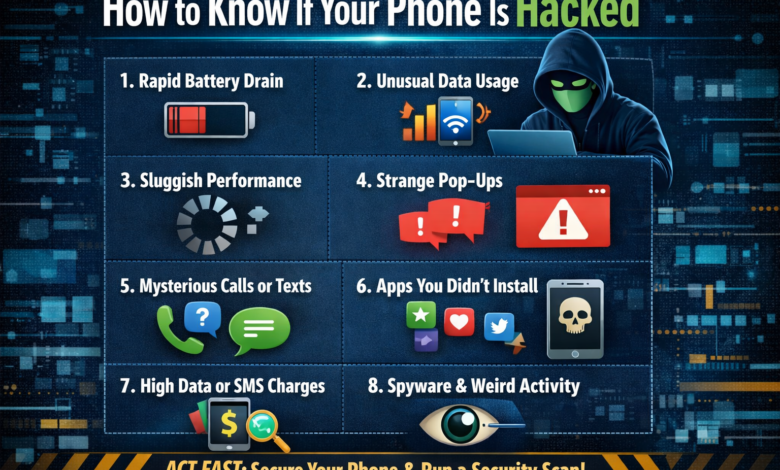
Below are the most important warning signs your phone is hacked. These red flags are confirmed by cybersecurity experts at the FTC, Zimperium, Norton, and Aura Security as the clearest indicators of a compromised device:
If you are experiencing 3 or more of these signs at the same time, the likelihood that your phone has been hacked is very high. Do not wait — act immediately by following the steps in Section 4.
3. Real-World Case Study: “Maria’s” Hacked Phone (USA, 2025)
How a Chicago Teacher Lost $4,200 to a Phone Hack She Almost Missed
Background: Maria (name changed) is a 34-year-old teacher who noticed her iPhone battery draining faster than usual in October 2025. She dismissed it as a software update issue. Over the following two weeks, she also noticed occasional pop-up ads and her phone feeling warm even when it was sitting idle and unused.
What Happened: Three weeks later, Maria received an alert that her savings account had made two unauthorized wire transfers totaling $4,200. Her email password had also been changed without her knowledge. A cybersecurity-savvy colleague investigated and discovered that banking spyware had been secretly installed through a fake “battery optimizer” app she had downloaded from outside the official App Store.
Warning signs she ignored:
- Rapid battery drain — dismissed as a normal software issue
- Phone overheating when idle — dismissed as weather-related
- An unrecognized app on her home screen — assumed to be pre-installed
- One unexpected 2FA verification code — dismissed as a system error
Key Lesson: Maria’s story is not unique. The FBI’s Internet Crime Complaint Center (IC3) received over 880,000 cybercrime complaints in 2024 alone. Mobile banking trojans — exactly like the one that targeted Maria — surged four times in the first half of 2025. Recognizing even one or two warning signs early could have saved her thousands of dollars and weeks of stressful recovery.
Resolution: A full factory reset successfully removed the malware from her device. She recovered $2,800 of the stolen funds through her bank’s fraud protection program. She now uses an authenticator app instead of SMS-based 2FA to prevent future attacks.
Interested in building a career in cybersecurity or technology? Learn everything you need to know in our in-depth guide: How to Become a Software Engineer in Pakistan (Complete 2026 Guide) — covering university degrees, self-taught routes, top programming languages, and salary expectations.

4. How to Check If Your Phone Is Hacked (Step-by-Step)
🤖 For Android Users
Check battery and data usage
Go to Settings → Battery and check for apps consuming unusually high power in the background. Next, go to Settings → Network → Data Usage and sort apps by highest usage. Any unfamiliar app using a large amount of data is a strong warning sign.
Review all installed apps
Go to Settings → Apps and scroll through the complete list of installed applications. Uninstall anything you do not recognize — especially apps without icons or with vague names such as “System Service” or “Phone Manager.”
Dial the secret check codes
Open your dialer and enter these codes:
Boot into Safe Mode
Press and hold the power button, then press and hold “Power Off” until the Safe Mode prompt appears. Select “Safe Mode.” If your phone performs normally in Safe Mode, a third-party app is responsible for the issue. Identify it and uninstall it immediately.
🍎 For iPhone Users
Run Apple’s Safety Check
Go to Settings → Privacy & Security → Safety Check. This built-in Apple tool allows you to review and revoke all access you have granted to people, apps, and connected devices. It is the most reliable way to check if your iPhone has been compromised.
Check for unknown configuration profiles
Go to Settings → General → VPN & Device Management. If you find any configuration profiles that you did not install yourself, remove them immediately. Unknown profiles are a major red flag and a common sign of enterprise-level spyware.
Review App Privacy Report
Go to Settings → Privacy & Security → App Privacy Report. This report shows you exactly which apps have been accessing your camera, microphone, location, and contacts — and how frequently. Look for any app accessing sensitive data unexpectedly.
Check connected Apple ID devices
Go to Settings → [Your Name] and scroll down to view every device currently signed into your Apple ID. If you see any device you do not recognize, tap on it and select “Remove from Account” immediately.
5. What to Do Immediately If Your Phone Is Hacked
The longer a hacker maintains access to your device, the greater the damage they can cause. Follow these steps in the exact order listed, as quickly as possible.
- Disconnect from the internet immediately. Turn off both Wi-Fi and mobile data. This prevents the hacker from continuing to access your device remotely or transmitting your personal data to their servers.
- Power off your phone. Shutting down the device stops any active malicious processes and gives you time to plan your next steps safely.
- Change all important passwords from a separate, trusted device. Use a clean computer or tablet — never your suspected hacked phone. Start with your email, bank, social media, and cloud storage accounts.
- Contact your bank immediately. Report the situation and ask them to monitor for unauthorized transactions. Request a card freeze if you suspect your financial data has been compromised.
- Call your mobile carrier. Ask them to check whether a SIM swap or number transfer has been requested. Set up an account PIN or lock to prevent future unauthorized changes.
- Run a full antivirus scan. Install a reputable mobile security app such as Malwarebytes, Bitdefender, or Avast, and perform a complete device scan to detect and remove any threats.
- Delete all suspicious apps. Remove every unfamiliar application found during your scan or manual review. When in doubt, uninstall it.
- Perform a factory reset as a last resort. If malware persists after completing all the steps above, back up only your essential files — do not do a full system backup — then perform a factory reset to restore your phone to a clean state.
After recovering your accounts, switch from SMS-based 2FA to an authenticator app such as Google Authenticator or Authy. SMS verification codes can be intercepted through SIM swap attacks, whereas authenticator apps generate codes locally on your device and cannot be hijacked remotely.
6. How to Protect Your Phone from Hackers
Prevention is always better than recovery. The following security habits are recommended by the FTC, the Cybersecurity and Infrastructure Security Agency (CISA), and leading mobile security professionals to keep your phone safe from hackers:
- Keep your operating system and all apps updated — security patches fix known vulnerabilities that hackers exploit
- Only download apps from the official App Store (iPhone) or Google Play Store (Android) — never from third-party sources. If you are using AI tools for study or work, read our guide on how to use ChatGPT safely for homework
- Use a strong, unique lock screen password — at minimum a 6-digit PIN, but ideally an alphanumeric passphrase
- Enable two-factor authentication (2FA) on all important accounts and use an authenticator app rather than SMS
- Avoid connecting to public Wi-Fi networks without a VPN — always use a reputable, paid VPN service when on public networks
- Regularly audit and revoke unnecessary app permissions, especially camera, microphone, and location access
- Contact your mobile carrier and set up an account PIN to block unauthorized SIM swap requests
- Install a trusted mobile antivirus app such as Bitdefender, Malwarebytes, or Norton Mobile Security
- Enable “Find My iPhone” on iOS or “Find My Device” on Android so you can remotely locate, lock, or wipe your phone if needed
- Never click links in unexpected SMS or WhatsApp messages — even if the message appears to come from your bank or a trusted source
Wondering how to use AI tools safely and responsibly? Read our complete beginner’s guide: How to Use ChatGPT for Homework (Step-by-Step Guide for Students) — covering prompts, ethical use, and how to avoid AI detection tools.
7. Frequently Asked Questions
Final Thoughts
Knowing how to tell if your phone is hacked is one of the most important digital skills you can have in 2026. Your smartphone is both your most valuable and most vulnerable device. The good news is that most phone hacks are detectable early — and fully recoverable — as long as you act quickly.
If you identified 3 or more warning signs from Section 2, do not wait — take action today. Run through the step-by-step checks in Section 4, follow the emergency response plan in Section 5, and adopt the prevention habits in Section 6 to stay protected going forward. If you are looking to build a career in technology and cybersecurity, explore our complete guide on how to become a software engineer in Pakistan.