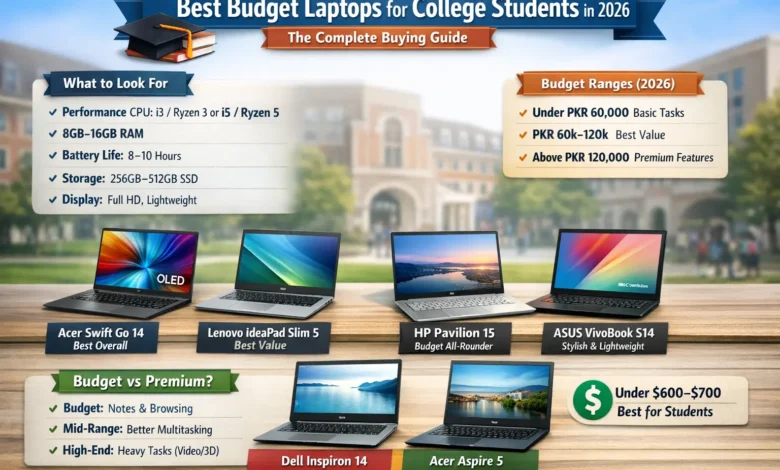
Walk into any college library in 2026 and one thing is immediately obvious — nearly every student has a laptop open in front of them. But with tuition, rent, and textbooks already hammering a tight budget, most students cannot afford to spend $1,500 on a machine. The good news? They don’t have to.
This guide is built on real data, tested specs, and verified 2026 pricing. Whether you’re a freshman figuring out your first semester or a transfer student upgrading a sluggish old machine, the following pages cut through the noise and tell you exactly what to buy, what to skip, and why — no fluff, no filler.
Why Every College Student Needs the Right Laptop
The Role of Laptops in Modern College Life
The laptop is no longer a convenience for college students — it is a necessity. Recent university surveys put student laptop ownership at 96%, underscoring how non-optional the category has become for coursework, online classes, entertainment, and specialized academic support workflows. Students rely on their laptops not just for writing papers, but for video lectures, assignment submissions, group project collaboration, and managing research across dozens of browser tabs simultaneously.
On average, 42% of students use their laptops more than six hours every day — more time than most people spend at a desk job. A machine that slows down, runs out of battery, or struggles with multitasking is not just inconvenient; it is genuinely disruptive to academic performance. The stakes of the wrong purchase are higher than most students realize when they first arrive on campus.
Major also shapes what “the right laptop” means. STEM majors tend to prefer ThinkPad at around 30% usage, largely due to keyboard quality and port selection, while arts students opt for MacBook at around 50% — reflecting how software ecosystems matter just as much as raw processor speed. For the majority of students who cannot stretch to a MacBook Air, the Windows and Chromebook budget segments in 2026 have never been stronger.
How Much Do College Students Actually Spend on Laptops?
Most students are working with tight budgets, and their laptop spending reflects that reality. According to research compiled by Research.com, 81% of students have laptops to help them through college, of which 72% choose a laptop based on price and spend an average of $761.32. That figure needs to cover a machine that will last through four years of increasingly demanding coursework.
The spending breakdown reveals clear clustering around the budget tier: 24% of students look at laptops priced below $300, another 20% search in the $300 to $600 range, and 22% look at the $900 to $1,200 bracket. The majority are shopping in the budget-to-mid-range tier — and the 2026 market rewards that instinct with better machines than ever before.
Why Budget Laptops Have Gotten So Much Better
A few years ago, a $400 laptop meant slow boot times, a dim display, and a processor that struggled with anything beyond a basic Word document. In 2026, that is no longer the case. Performance expectations have risen: 16GB RAM and a 512GB SSD are becoming the norm for students, not a premium upgrade. Budget guidance under $800 is converging on similar baselines across all major manufacturers.
AI-ready laptops with 40+ TOPS NPUs now represent 40% of the student market share, and top models average 15 or more hours of battery life. Meanwhile, the ARM-chip revolution — led by Apple’s M-series and Qualcomm’s Snapdragon X — is pushing Intel and AMD to deliver more efficient chips at every price point. The result: the gap between a $450 student laptop and a $1,200 premium machine has never been smaller.
What to Look for in a Budget Laptop for College
Processor and RAM — The Performance Basics
The processor and RAM define your daily experience more than anything else on a spec sheet. For 2026, the minimum recommended configuration for college students is an Intel Core i5 or AMD Ryzen 5. Intel Celeron and Pentium processors are adequate for very basic tasks but will feel noticeably slow within one to two years as software requirements grow — a real problem for a machine you need to last four years.
On RAM: 8GB is the floor, but 12 to 16GB is where you want to land if the budget allows. Real-world testing shows a significant difference in multitasking performance when comparing 8GB versus 16GB systems, especially with multiple browser tabs, a PDF reader, Microsoft Word, and a Zoom call running simultaneously — which is exactly what a typical college morning looks like.
For storage: 256GB SSD is workable but tight. 512GB is the sweet spot. Any laptop that still ships with a mechanical hard drive (HDD) in 2026 should be avoided — it will feel slow from day one and only get worse over time.
Battery Life — The Most Underrated Feature
Students consistently underestimate how much battery life matters — until their laptop dies mid-lecture in a seat far from the nearest outlet. A minimum of 8 to 10 hours of real-world battery life is essential. Anything less and you are carrying a charger everywhere, which defeats the purpose of a portable device.
In practical 2026 testing, Chromebooks consistently outperform Windows laptops in this category at the budget level. The Acer Chromebook Plus 514 clocked 12 hours and 50 minutes in independent testing — more than three hours longer than the budget Windows laptops in the same test group. None of the budget Windows laptops tested cleared 8 hours and 19 minutes. If all-day battery life is your top priority, a Chromebook has a genuine structural advantage at the sub-$400 price point.
Portability, Build Quality, and Display
A laptop that lives in a backpack every day needs to survive it. Most students find that a 13 to 15-inch machine in the 3 to 4 pound range strikes the right balance between screen size and portability. A 15.6-inch laptop at 3.5 pounds is manageable across a long campus day; a 17-inch machine at 5+ pounds is fatiguing.
Display quality is one of the most overlooked specs at the budget level. Look for at least 1080p (Full HD) resolution — a 1366×768 HD panel will look noticeably blurrier and more tiring on a 15-inch screen. IPS panels offer better color accuracy and viewing angles than TN alternatives. Target at least 250 to 300 nits of brightness for comfortable indoor and outdoor use. OLED screens are beginning to appear in 25% of premium student models in 2026, but are not yet common in the true budget tier.
Best Budget Laptops for College Students in 2026
The following four laptops represent the strongest options across different student profiles in 2026. All specs and pricing have been verified against manufacturer listings and independent reviews as of April 2026.
| Laptop | Price Range | Processor | RAM / Storage | Battery | Best For |
|---|---|---|---|---|---|
| Acer Aspire Go 15★ Top Pick | $299–$629 | Intel Core 3 N355 / i5-1334U | 8–16GB / 128GB–512GB SSD | ~10–12.5 hrs | Most students |
| Lenovo IdeaPad Slim 3 | $400–$770 | Intel Core 5 210H / Ryzen 5 | 16GB / 1TB SSD | 6–8 hrs | Daily portability |
| HP 15 (Ryzen 3 7320U) | $299–$450 | AMD Ryzen 3 7320U | 8GB / 128–512GB SSD | ~8.5–10.5 hrs | Budget Windows users |
| Acer Chromebook Plus 514 | $299–$399 | Intel Core i3 / MediaTek | 8GB / 128GB eMMC | 12–13 hrs | Web-first students |
| Display | 15.6″ FHD IPS 1080p (15.3″ WUXGA 1920×1200 on higher configs) |
| Processor | Intel Core 3 N355 (base) → Intel Core i5-1334U (top config) |
| RAM | 8GB DDR5 (base); 16GB on AG15-51P / AG15-71P configs |
| Storage | 128GB UFS (base) → 256GB–512GB PCIe Gen4 NVMe SSD (recommended) |
| Battery | ~10–12.5 hours real-world |
| Weight | 3.53–3.72 lbs |
| Ports | 2× USB-C with charging, HDMI, USB-A, headphone jack, Wi-Fi 6 |
The Acer Aspire Go 15 is the standout recommendation for most college students in 2026. Its pricing spans from $299 for the base model to $629 for the Core i7 AG15-71P configuration, putting it squarely against Chromebooks at the low end and mainstream Windows laptops at the high end — while offering full Windows 11 desktop application support throughout the range.
The FHD IPS display is the single most important reason to choose it over competitors at similar price points — you will notice the difference during long research sessions. Fast charging on higher configurations takes the battery from dead to 93% in roughly 30 minutes. The dual USB-C ports, both supporting charging, allow you to charge from either side depending on your desk or workspace layout.
The caveats are real: the base model’s 128GB UFS storage is slow and tight, the keyboard lacks backlighting, and the 720p webcam is below average even by budget standards. The recommendation: target the AG15-51P or AG15-71P configurations with PCIe NVMe SSD storage, and avoid the base AG15-31P/32P models with UFS storage if you can stretch the budget.
| Display | 15.3″ FHD+ IPS 1920×1200, 300 nits, 60Hz (touch available) |
| Processor | Intel Core 5 210H (Raptor Lake) or AMD Ryzen 5 variants |
| RAM | 16GB DDR5 |
| Storage | 1TB PCIe Gen4 NVMe SSD |
| Battery | 6–8 hours real-world |
| Weight | 3.59 lbs |
| Ports | USB-A ×2, USB-C ×1, HDMI 1.4, SD card reader, headphone jack |
The Lenovo IdeaPad Slim 3 ships with 16GB RAM and 1TB SSD in many configurations — exceptional at the price. For students in business, humanities, or any writing-heavy major, the 16:10 aspect ratio display gives more vertical screen real estate, useful for long documents and web pages. At 3.59 pounds it is reasonably portable, and the Cosmic Blue colorway looks more polished than its price tag suggests.
The trade-offs matter: independent testing found battery life of only 6 to 8 hours in practice, meaning you will likely need to carry a charger for full class days. The Core 5 210H processor is based on last-generation Raptor Lake architecture, and multiple reviewers noted the display as “unusually dim” with “rather dull” colors at its rated 300 nits. At $400 to $500 on AMD Ryzen configurations it represents strong value; at $769 for the Costco Intel config, comparison shopping is warranted. The IdeaPad Slim 3x variant with Snapdragon processor delivers 16+ hours of battery life and is a better long-term choice for battery-first students.
| Display | 15.6″ FHD 1080p, micro-edge anti-glare, 250–300 nits |
| Processor | AMD Ryzen 3 7320U (4-core, up to 4.1GHz) |
| RAM | 8GB (non-upgradeable on base config) |
| Storage | 128GB–512GB SSD |
| Battery | ~8.5–10.5 hours (rated up to 10h 30m) |
| Weight | ~3.5 lbs (1.59 kg) |
| Camera | 1080p Full HD webcam with physical privacy shutter |
The HP 15 is the budget Windows laptop most students will actually find at their local retailer, and it earns its shelf space. The AMD Ryzen 3 7320U handles web browsing, Office apps, Zoom calls, and streaming video lectures without drama, and the 1080p Full HD webcam with a physical privacy shutter is a meaningful upgrade over the 720p cameras found on most budget rivals.
Its standout feature is all-day battery life: real-world testing found approximately 8.5 to 10.5 hours depending on workload — enough to get through a full day of classes without hunting for an outlet. The 45W fast charger restores 50% capacity in 45 minutes. The limitations are familiar: non-upgradeable RAM on base configurations limits long-term headroom, integrated AMD Radeon graphics are not suitable for gaming or demanding creative work, and display color accuracy is average. For students who primarily write papers, attend online lectures, and use productivity tools, the HP 15 is dependable at an honest price.
| Display | 14″ FHD IPS 1080p, touchscreen available |
| Processor | Intel Core i3 (12th Gen) or MediaTek Kompanio |
| RAM | 8GB |
| Storage | 128GB eMMC |
| Battery | 12 hours 50 minutes (CNN Underscored independent test) |
| OS | Chrome OS · 12 months Google AI Pro included |
| Charging | USB-C (any USB-C cable works) |
For students whose coursework runs primarily through a browser — Google Docs, Slides, online research portals, and streaming lectures — the Acer Chromebook Plus 514 offers the best performance-per-dollar of anything in the 2026 budget segment. In CNN Underscored battery testing, it lasted 12 hours and 50 minutes at 50% brightness on a looping 1080p video — more than three hours longer than the budget Windows laptops in the same comparison.
Chrome OS has matured considerably. The included 12 months of Google AI Pro provides Gemini as a capable research assistant and NotebookLM for organizing coursework resources. USB-C charging on all ports means you can borrow any USB-C cable from a classmate in a pinch. The honest limitation remains software compatibility: if your major requires specific desktop applications that cannot run in a browser or Linux layer, a Windows laptop is the better fit. For business, humanities, education, or communications students, however, the Chromebook Plus 514 makes a compelling case at $299.
How to Choose a Budget Laptop Based on Your Major
The best budget laptop depends heavily on what you actually need it to do. Here is how the decision breaks down by major type.
STEM, Coding, and Engineering Students
Students in computer science, data science, and engineering place heavier demands on their hardware than most. Running local development environments, compiling code, handling large datasets, and running simulations require more than an entry-level processor can reliably deliver. For this group, 16GB of RAM is a minimum, not a bonus, and processor generation matters more than it does for general-use students.
The refurbished ThinkPad market is a legitimate option here. Business-class ThinkPads (T480, T490, T14 Gen 2/3) are retired by companies after three to four years and are built to high durability standards. A T14s Gen 2 or Gen 3 with 16GB RAM and an SSD can often be found for $400 to $500 on Amazon Renewed or eBay — with keyboard quality and port selection that exceeds many new budget laptops at the same price. For new laptops, look for the Lenovo V Series with an Intel i5-13420H and 16GB RAM, which campus testing identifies as the top recommendation for CS and engineering students who need extra performance without entering premium pricing.
Business, Liberal Arts, and Humanities Students
Students in business, English, communications, and related fields have the most flexibility on specs. Their core tasks — writing papers, spreadsheets, presentations, video calls, and research — are not processor-intensive, which means almost any modern budget laptop handles them comfortably. For this group, the priority list shifts toward battery life, keyboard comfort, display quality, and overall portability. The Acer Aspire Go 15 and the HP 15 are both excellent fits, and the Acer Chromebook Plus 514 makes a strong case for students whose institutions use Google Workspace. Staying under $400 is achievable without meaningful academic compromise for this group in 2026.
Design, Media, and Creative Students on a Budget
Design students face the trickiest challenge in the budget tier. Photo editing, video production, and graphic work all benefit from a higher-quality display, more RAM, and at minimum robust integrated graphics. This is the one student group where spending a little more tends to pay off directly. The HP 15 with AMD Ryzen 7 7735HS packs Radeon 680M graphics along with 16GB DDR5 RAM and a 512GB Gen4 SSD — a configuration that handles Lightroom, Premiere, and Illustrator far more comfortably than a standard Intel UHD setup at a similar price point.
💻 CS / Engineering
Prioritize: 16GB RAM, Core i5+ / Ryzen 5+, 512GB SSD
Top pick: Lenovo V Series or refurbished ThinkPad T14
📝 Humanities / Business
Prioritize: Battery life, keyboard comfort, display brightness
Top pick: Acer Aspire Go 15 or Chromebook Plus 514
🎨 Design / Media
Prioritize: AMD Radeon graphics, 16GB RAM, display color accuracy
Top pick: HP 15 Ryzen 7 / Asus VivoBook with Radeon
📊 General / Undecided
Prioritize: Value, reliability, 4-year longevity
Top pick: Acer Aspire Go 15 (AG15-51P config)
Where and When to Buy a Budget Laptop for the Best Price
Best Times to Buy — Sales Seasons to Watch
Timing a laptop purchase correctly can save $50 to $150 without changing a single spec. The two best sales periods of the year are back-to-school season (July to mid-August) and Black Friday/Cyber Monday (late November). Amazon, Best Buy, and manufacturer websites all run targeted promotions during these windows on exactly the student-focused machines covered in this guide. Students who plan ahead — rather than buying in a panic the week before the semester starts — consistently land better configurations at lower prices.
New vs. Refurbished Laptops for Students
The refurbished market deserves serious consideration, particularly for students whose budgets sit closer to $300 than $500. Reputable refurbished sellers put laptops through rigorous testing and typically offer one-year warranties and 30-day return policies. A refurbished Dell Inspiron 15 5000 with 8GB RAM, 256GB storage, and a Full HD display can cost around $350, compared to $600 or more for a new equivalent. ThinkPad T-series machines built to corporate durability standards are regularly listed with 16GB configurations and SSDs for $320 to $400 on Amazon Renewed or eBay — not glamorous, but reliably capable for years.
How to Evaluate a Laptop Before You Buy
Before committing to any purchase, check three things that specification sheets often obscure. First, verify the storage type — UFS and eMMC are significantly slower than PCIe NVMe SSD and will affect startup times and daily responsiveness. Second, check whether RAM is soldered (non-upgradeable) or socketed; soldered 8GB machines cannot be upgraded later and will hit their ceiling faster. Third, look at real-world battery life numbers from independent reviewers rather than manufacturer claims, which are typically measured under ideal conditions that do not reflect campus use.
Final Buying Checklist Before You Purchase
Run through this list before confirming any budget laptop purchase in 2026. It takes five minutes and prevents most common student buying mistakes.
- Processor is Intel Core i5 / AMD Ryzen 5 or better — avoid Celeron/Pentium Celeron and Pentium chips will feel slow within 1–2 years as software requirements increase
- RAM is at least 8GB — 16GB strongly preferred 16GB makes a measurable difference for multitasking with many browser tabs and apps open
- Storage is a PCIe NVMe SSD (not eMMC or UFS) — 256GB minimum, 512GB ideal SSD type matters as much as size — slow eMMC storage hurts everyday responsiveness
- Display is 1080p FHD or higher — avoid HD (1366×768) panels HD panels look blurrier and cause more eye fatigue on 15-inch screens
- Battery life is rated 8+ hours by independent reviewers — not manufacturer claims Manufacturer claims are measured under ideal conditions — expect 20–30% less in real use
- Weight is under 4 lbs for daily campus carry 3.5 lbs is the practical sweet spot for 15-inch machines
- Has at least one USB-C port, ideally with charging support USB-C charging means you can borrow a cable anywhere on campus
- Check student discount pricing before buying at retail Dell, Apple, HP, and Lenovo all offer verified student pricing — often $100–200 off
- For refurbished: verify seller rating, return policy, and warranty length Amazon Renewed and manufacturer-certified refurbs are the safest entry points
Frequently Asked Questions
Sources: Research.com (student laptop spending data) · FindingDulcinea (2026 campus testing) · CNN Underscored (battery life testing) · PCWorld (Acer Aspire Go 15 and Lenovo IdeaPad Slim 3 reviews) · Tom’s Guide (Lenovo IdeaPad Slim 3x review) · TechRadar (Acer Aspire Go 15 and IdeaPad Slim 3 reviews) · Techlicious (IdeaPad Slim 3i review) · ElectroIQ (student laptop usage statistics 2026) · el-balad.com (2026 student laptop survey data) · BestStudentsLaptop.com (real-world spending guide) · Thurrott.com (IdeaPad Slim 3 review) · PCVarge (HP 15 and Acer Aspire Go 15 reviews) · Amazon product pages (specs verified April 2026)
Last updated: April 1, 2026. Prices and availability may change. Always verify current pricing at retailer websites before purchasing.







One Comment